Showing posts with label data mining. Show all posts

Wednesday, May 21, 2014

Use recursion and gradient ascent to solve logistic regression in Python

In his book Machine Learning in Action, Peter Harrington provides a solution for parameter estimation of logistic regression . I use pandas and ggplot to realize a recursive alternative. Comparing with the iterative method, the recursion costs more space but may bring the improvement of performance.
# -*- coding: utf-8 -*-
"""
Use recursion and gradient ascent to solve logistic regression in Python
"""


import pandas as pd
from ggplot import *

def sigmoid(inX):
return 1.0/(1+exp(-inX))

def grad_ascent(dataMatrix, labelMat, cycle):
"""
A function to use gradient ascent to calculate the coefficients
"""

if isinstance(cycle, int) == False or cycle < 0:
raise ValueError("Must be a valid value for the number of iterations")
m, n = shape(dataMatrix)
alpha = 0.001
if cycle == 0:
return ones((n, 1))
else:
weights = grad_ascent(dataMatrix, labelMat, cycle-1)
h = sigmoid(dataMatrix * weights)
errors = (labelMat - h)
return weights + alpha * dataMatrix.transpose()* errors

def plot(vector):
"""
A funtion to use ggplot to visualize the result
"""

x = arange(-3, 3, 0.1)
y = (-vector[0]-vector[1]*x) / vector[2]
new = pd.DataFrame()
new['x'] = x
new['y'] = array(y).flatten()
infile.classlab = infile.classlab.astype(str)
p = ggplot(aes(x='x', y='y', colour='classlab'), data=infile) + geom_point()
return p + geom_line

# Use pandas to manipulate data
if __name__ == '__main__':
infile = pd.read_csv("https://raw.githubusercontent.com/pbharrin/machinelearninginaction/master/Ch05/testSet.txt", sep='\t', header=None, names=['x', 'y', 'classlab'])
infile['one'] = 1
mat1 = mat(infile[['one', 'x', 'y']])
mat2 = mat(infile['classlab']).transpose()
result1 = grad_ascent(mat1, mat2, 500)
print plot(result1)
​r

Tuesday, December 10, 2013

PROC PLS and multicollinearity

Multicollinearity and its consequences

Multicollinearity usually brings significant challenges to a regression model by using either normal equation or gradient descent.

1. Invertible SSCP for normal equation

According to normal equation, the coefficients could be obtained by \hat{\beta}=(X'X)^{-1}X'y. If the SSCP turns to be singular and non-invertible due to multicollinearity, then the coefficients are theoretically not solvable.

2. Unstable solution for gradient descent

The gradient descent algorithm seeks to use iterative methods to minimize residual sum of squares (RSS). For example, as the plot above shows, if there is strong relationship between two regressors in a regression, many possible combinations of \beta1 and \beta2 lie along a narrow valley, which all corresponds to the minimal RSS. Thus \beta1 can be negative, positive or even zero, which becomes a confounding effect with respect to a stable model.

Partial Least Squares v.s. Principle Components Regression

The most direct way to deal with multicollinearity is to break down the regressors and construct new orthogonal variables. PLS and PCR are both dimension reduction methods that eliminate multicollinearity. The difference is that PLS also implements the response variable to select the new components. PLS is particularly useful in answering questions with multiple response variables. The PLS procedure in SAS is a powerful and flexible tool applying either PLS or PCR. One book, An Introduction to StatisticalLearning, suggests PCR over PLS.
While the supervised dimension reduction of PLS can reduce bias, it also has the potential to increase variance, so that the overall benefit of PLS relative to PCR is a wash.
In the example using the baseball data set below, with 10-fold cross-validation, PLS chooses 9 components, while PCR picks out 5.
filename myfile url 'https://svn.r-project.org/ESS/trunk/fontlock-test/baseball.sas';
%include myfile;
proc contents data=baseball position;
ods output position = pos;
run;

proc sql;
select variable into: regressors separated by ' '
from pos
where num between 5 and 20;
quit;
%put ®ressors;

data baseball_t;
set baseball;
logsalary = log10(salary);
run;

proc pls data=baseball_t censcale nfac=10 cv=split(10);
title 'partial least squares';
model logsalary=®ressors;
run;

proc pls data=baseball_t censcale method = pcr nfac=10 cv=split(10);
title 'princinple components regression';
model logsalary=®ressors;
run;

Monday, December 9, 2013

Use R in Hadoop by streaming

It seems that the combination of R and Hadoop is a must-have toolkit for people working with both statistics and large data set.

An aggregation example

The Hadoop version used here is Cloudera’s CDH4, and the underlying Linux OS is CentOS 6. The data used is a simulated sales data set form a training course by Udacity. Format of each line of the data set is: date, time, store name, item description, cost and method of payment. The six fields are separated by tab. Only two fields, store and cost, are used to aggregate the cost by each store.
A typical MapReduce job contains two R scripts: Mapper.R and reducer.R.
Mapper.R
# Use batch mode under R (don't use the path like /usr/bin/R)  
#! /usr/bin/env Rscript

options(warn=-1)

# We need to input tab-separated file and output tab-separated file

input = file("stdin", "r")
while(length(currentLine = readLines(input, n=1, warn=FALSE)) > 0) {
fields = unlist(strsplit(currentLine, "\t"))
# Make sure the line has six fields
if (length(fields)==6) {
cat(fields[3], fields[5], "\n", sep="\t")
}
}
close(input)
Reducer.R
#! /usr/bin/env Rscript  

options(warn=-1)
salesTotal = 0
oldKey = ""

# Loop around the data by the formats such as key-val pair
input = file("stdin", "r")
while(length(currentLine = readLines(input, n=1, warn=FALSE)) > 0) {
data_mapped = unlist(strsplit(currentLine, "\t"))
if (length(data_mapped) != 2) {
# Something has gone wrong. However, we can do nothing.
continue
}

thisKey = data_mapped[1]
thisSale = as.double(data_mapped[2])

if (!identical(oldKey, "") && !identical(oldKey, thisKey)) {
cat(oldKey, salesTotal, "\n", sep="\t")
oldKey = thisKey
salesTotal = 0
}

oldKey = thisKey
salesTotal = salesTotal + thisSale
}

if (!identical(oldKey, "")) {
cat(oldKey, salesTotal, "\n", sep="\t")
}

close(input)

Testing

Before running MapReduce, it is better to test the codes by some linux commands.
# Make R scripts executable   
chmod w+x mapper.R
chmod w+x reducer.R
ls -l

# Strip out a small file to test
head -500 purchases.txt > test1.txt
cat test1.txt | ./mapper.R | sort | ./reducer.R

Execution

One way is to specify all the paths and therefore start the expected MapReduce job.
hadoop jar /usr/lib/hadoop-0.20-mapreduce/contrib/streaming/hadoop-streaming-2.0.0-mr1-cdh4.1.1.jar   
-mapper mapper.R –reducer reducer.R
–file mapper.R –file reducer.R
-input myinput
-output joboutput
Or we can use the alias under CDH4, which saves a lot of typing.
hs mapper.R reducer.R myinput joboutput
Overall, the MapReduce job driven by R is performed smoothly. The Hadoop JobTracker can be used to monitor or diagnose the overall process.

Rhadoop or streaming?

RHadoop is a package developed under Revolution Alytics, which allows the users to apply MapReduce job directly in R and is surely a much more popular way to integrate R and Hadoop. However, this package currently undergoes fast evolution and requires complicated dependency. As an alternative, the functionality of streaming is embedded with Hadoop, and supports all programming languages including R. If the proper installation of RHadoop poses a challenge, then streaming is a good starting point.

Friday, November 29, 2013

A cheat sheet for linear regression validation

The link of the cheat sheet is here.
I have benefited a lot from the UCLA SAS tutorial, especially the chapter of regression diagnostics. However, the content on the webpage seems to be outdated. The great thing for PROC REG is that it creates a beautiful and concise 3X3 plot panel for residual analysis.
I created a cheat sheet to try to interpret the diagnosis panel. Thanks to the ESS project, the BASEBALL data set used by SAS is available for public. Hereby I borrowed this data set as an example, and the cheat sheet also contains the data and the SAS program. The regression model attempts to predict the baseball players’ salary by their performance statistics. The plot panel can be partitioned into four functional zones:
  1. OLS assumption check
    The three OLS assumption is essential to linear regression for BLUE estimators. However, the residual plot above on the left-top panel has a funnel-like shape, which is usually corrected by a log transformation in practice.
  2. Normality check
    In reality the normality is not required for linear regression. However, most people like to see t-test, F-test or P value which needs the normality of residual. The histogram and Q-Q plot on the left-bottom are good reference.
  3. Outlier and influential points check
    The three top-right plots can be used to rule out some extraordinary data points by leverage, Cook’s D and R-studentized residues.
  4. Non-linearity check
    Rick Wicklin has a thorough introduction about the fit-mean plot. We can also look at r-square in the most bottom-right plot . If the linearity is not very satisfied, SAS/STAT has a few powerful procedures to correct non-linearity and increase the fitting performance, such as the latest ADAPTIVEREG procedure (see a diagram in my previous post).
There are still a few other concerns that need to be addressed for linear regressio such as multicolinearity (diagnosed by the VIF and other options in PROC REG) and overfitting (PROC GLMSELECT now weights in).
The PROC procedure in SAS solves the parameters by the normal equation instead of the gradient descent, which makes it always an ideal tool for linear regression diagnosis.
/*I. Grab the football data set from web */
filename myfile url 'https://svn.r-project.org/ESS/trunk/fontlock-test/baseball.sas';
%include myfile;

proc contents data=baseball position;
ods output position = pos;
run;

/*II. Diagnose the multiple linear regression for the players’ salaries*/
proc sql;
select variable into: regressors separated by ' '
from pos
where num between 5 and 20;
quit;
%put &regressors;

proc reg data=baseball;
model salary = &regressors;
run;

/*III. Deal with heteroscedasticity*/
data baseball_t;
set baseball;
logsalary =
log10(salary);
run;

proc reg data=baseball_t;
model logsalary =
&regressors;
run;

Thursday, November 21, 2013

Kernel selection in PROC SVM

The support vector machine (SVM) is a flexible classification or regression method by using its many kernels. To apply a SVM, we possibly need to specify a kernel, a regularization parameter c and some kernel parameters like gamma. Besides the selection of regularization parameter c in my previous post, the SVM procedure and the iris flower data set are used here to discuss the kernel selection in SAS.

Exploration of the iris flower data

The iris data is classic for classification exercise. If we use the first two components from Principle Component Analysis (PCA) to compress the four predictors, petal length, petal width, sepal length, sepal width, to 2D space, then two linear boundaries seem barely able to separate the three different species such as Setosa, Versicolor and Virginica. In general, the SASHELP.IRIS is a well-separated data set for the response variable
****(1). Data exploration of iris flower data set****;
data iris;
set sashelp.iris;
run;

proc contents data=iris position;
run;

proc princomp data=iris out=iris_pca;
var Sepal: Petal:;
run;

proc sgplot data=iris_pca;
scatter x = prin1 y = prin2 / group = species;
run;

PROC SVM with four different kernels

Kernel methodsOption in SASFormulaParameter in SAS
linearlinearu’*vNA
polynomialpolynom(gamma*u’*v + coef)^degreeK_PAR
radial basisRBFexp(-gamma*|u-v|^2)K_PAR
sigmoidsigmoidtanh(gamma*u’*v + coef)K_PAR; K_PAR2
PROC SVM in SAS has provided a range of kernels for selection, including ERBFFOURIERLINEARPOLYNOMRBFRBFRECSIGMOID and TANH. Another great thing is that it supports cross-validation including Leave-One-Out Cross-Validation ( by loo option in PROC SVM) and k-Fold Cross-Validation (by split option in PROC SVM).
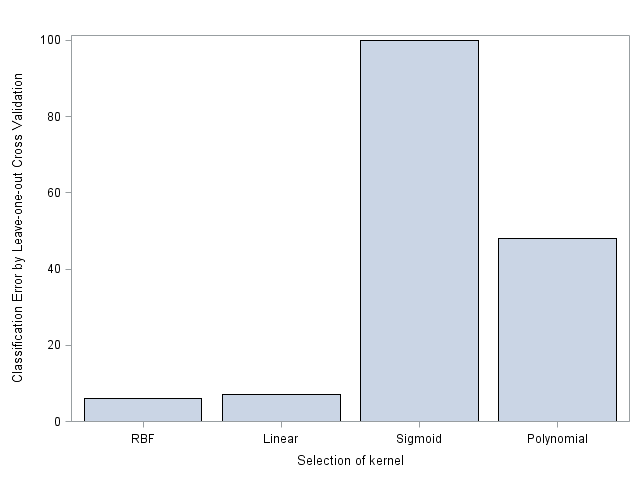
Here the error rates of Leave-One-Out Cross-Validation is used to compare the performance among the four common kernels including linear, radial basis function, polynomial and sigmoid. And in this experiment most time the parameters such as c and gamma are arbitrarily set to be 1. As the result showed in the bar plot, the RBF and linear kernels bring great results, while RBF is slightly better than linear. On the contrary, the polynomial and sigmoid kernels behave very badly. In conclusion, the selection of kernel for SVM depends on the reality of the data set. A non-linear or complicated kernel is actually not necessary for an easily-classified example like the iris flower data set.

****(2). Cross validation error comparison of 4 kernels****;
proc dmdb batch data=iris dmdbcat=_cat out=_iris;
var Sepal: Petal:;
class species;
run;

%let knl = linear;
proc svm data=_iris dmdbcat=_cat kernel=&knl c=1 cv =loo;
title "The kernel is &knl";
ods output restab = &knl;
var Sepal: Petal:;
target species;
run;

%let knl = rbf;
proc svm data=_iris dmdbcat=_cat kernel=&knl c=1 K_PAR=1 cv=loo;
title "The kernel is &knl";
ods output restab = &knl;
var Sepal: Petal:;
target species;
run;

%let knl = polynom;
proc svm data=_iris dmdbcat=_cat kernel=&knl c=1 K_PAR =3 cv=loo;
title "The kernel is &knl";
ods output restab = &knl;
var Sepal: Petal:;
target species;
run;

%let knl = sigmoid;
proc svm data=_iris dmdbcat=_cat kernel=&knl c=1 K_PAR=1 K_PAR2=1 cv=loo;
title "The kernel is &knl";
ods output restab = &knl;
var Sepal: Petal:;
target species;
run;

data total;
set linear rbf polynom sigmoid;
where label1 in ('Kernel Function','Classification Error (Loo)');
cValue1 = lag(cValue1);
if missing(nValue1) = 0;
run;

proc sgplot data=total;
title " ";
vbar cValue1 / response = nValue1;
xaxis label = "Selection of kernel";
yaxis label = "Classification Error by Leave-one-out Cross Validation";
run;

Wednesday, November 13, 2013

When ROC fails logistic regression for rare-event data


ROC or AUC is widely used in logistic regression or other classification methods for model comparison and feature selection, which measures the trade-off between sensitivity and specificity. The paper by Gary King warns the dangers using logistic regression for rare event and proposed a penalized likelihood estimator. In PROC LOGISTIC, the FIRTH option implements this penalty concept.
When the event in the response variable is rare, the ROC curve will be dominated by minority class and thus insensitive to the change of true positive rate, which provides litter information for model diagnosis. For example, I construct a subset of SASHELP.CARS with the response variable Type including 3 hybrid cars and 262 sedan cars, and hope to use the regressors, Weight, Wheelbase, Invoice to predict whether a car’s type is either hybrid or sedan. After the logistic regression, the AUC tents to be 0.9109 that is a pretty high value. However, the model is still ill-fitted and needs tuning, since the classification table shows the sensitivity is zero.
data rare;
set sashelp.cars;
where type in ("Sedan", "Hybrid");
run;

proc freq data = rare;
tables type;
run;

proc logistic data = rare;
model Type(event='Hybrid') = Weight Wheelbase Invoice
/ pprob = 0.01 0.05 pevent = 0.5 0.05 ctable;
roc;
run;
Prob EventProb LevelCorrect EventCorrect Non-EventIncorrect EventIncorrect Non-EventAccuracySensitivitySpecificityFalse POSFalse NEG
0.5000.010221151173.666.780.522.629.3
0.5000.50002620350.00.0100.0.50.0
0.0500.010221151179.866.780.584.72.1
0.0500.50002620395.00.0100.0.5.0

Solution

In case that ROC won’t help PROC LOGISTIC any more, there seem three ways that may increase the desired sensitivity or boost the ROC curve.
  1. Lower the cut-off probability
    In the example above, moving the cut-off probability to an alternative value to 0.01 will significant increase the sensitivity. However, the result comes with the drastic loss of specificity as the cost.
  2. Up-sampling or down-sampling
    Imbalanced classes in the response variable could be adjusted by unequal weight such as up-sampling or down-sampling. Down-sampling, would be easy to fulfill using a stratified sampling by PROC SURVEYSELECT. Up-sampling is more appropriate for this case, but may need over-sampling techniques in SAS.
  3. Use different criterions such as F1 score
    For modeling rare event classification, the most important factors should be sensitivity and precision, instead of accuracy that combines sensitivity and specificity. On the contrary, the F1 score can be interpreted as a weighted average of the sensitivity and precision, which makes it a better candidate to replace AUC.
    \text{F1 score} = {2* {precision * sensitivity\over precision + sensitivity}}

Thursday, August 29, 2013

A SAS macro that exports data to MongoDB

MongoDB is possibly the most popular NoSQL data store. To bypass schema and constraint, I feel quite convenient to implement MongoDB as buffer to accompany current RDBMS .Also it is straightforward to use MongoDB and other tools (MEAN) to build some simple web apps for statistics presentation.
Neither SAS nor 10gen so far published any SAS-MongoDB driver. However, the table-like dataset in SAS can be transformed to CSV by PROC EXPORT or DATA Step. MongoDB has a nice API mongoimport that easily accepts CSV formatted data. I write a macro in SAS below to transport data from SAS to MongoDB. The speed is quite fast.
****************(1) MODULE-BUILDING STEP********************************;
%macro sas2mongo(data =, dbname = , collname =, tmpfolder =, mongofolder = );
/*************************************************************************
* MACRO: sas2mongo()
* GOAL: output a dataset in SAS to a collection in MongoDB
* PARAMETERS: data = SAS dataset to export
* dbname = database name in MongoDB
* collname = collection name in MongoDB
* tmpfolder = Windows directory for temporary file exchange
* mongofolder= bin directory where MongoDB was installed
*************************************************************************/
proc export data=&data outfile="&tmpfolder.\tmp.csv" dbms=csv replace;
run;
options noxsync noxwait;
%put the execuated command is: &mongofolder\mongoimport.exe -d
&dbname -c &collname --type csv --file &tmpfolder.\tmp.csv --headerline;
x "&mongofolder\mongoimport.exe -d &dbname -c &collname --type
csv --file &tmpfolder.\tmp.csv --headerline";
%mend;

****************(2) TESTING STEP****************************************;
%sas2mongo(data = sashelp.class, dbname = demo, collname = class,
tmpfolder = c:\tmp, mongofolder =c:\mongodb\bin);
Then I run commands in Mongo shell. It works just well.
use demo;
db.class.find();

Wednesday, July 31, 2013

Regularization adjustment for PROC SVM

SVM is a popular statistical learning method for either classification or regression. For classification, a linear classifier or a hyperplane, such as f(x) = w^TX+b with w as weight vector and b as the bias, would label data into various categories. The geometric margin is defined as 2\over{||w||}. For SVM, the maximum margin approach is equivalent to minimize {||w||}^2. However, with the introduction of regularization to inhibit complexity, the optimization has to upgrade to minimize {||w||}^2+C\Sigm^N_i\xi_i, where C is the regularization parameter. Eventually the solution for SVM turns out to be a quadratic optimization problem over w and ξ with the constraints of y_if(X_i)\ge1-\xi_i.
Since the sashelp.class dataset is extremely simple, I attempt to use its variables age and weight to predict sex, which is just for demonstration purpose. According to the plot, the data points are linearly non-separable. The kernel methods have to be applied to map the input data to a high-dimensional space so that they are linearly separable. To harness SVM in SAS, three procedures are commonly used under the license of SAS EMiner. For example, PROC DMDB is used to recode the categorical data and set up the working catalog, PROC SVM is used to build the model, and PROC SVMSCORE is applied to implement the model.
proc sgplot data=sashelp.class;
scatter x = weight y = age / group = sex;
run;

proc dmdb batch data=sashelp.class dmdbcat=_cat out=_class;
var weight age;
class sex;
run;

Hard margin

If we let C be infinitely large, then all constraints will be executed. Therefore, the margin is narrowed down.
proc svm data=_class dmdbcat=_cat c=1e11 kernel=linear out= _1;
title 'hard margin';
ods output restab = restab1;
var weight age ;
target sex;
run;
The accuracy is 63.16%. Overall, the result is below.
NameValue
Regularization Parameter C100000000000
Classification Error (Training)7.000000
Geometric Margin1.624447E-10
Number of Support Vectors17
Estimated VC Dim of Classifier3.4494098E24
Number of Kernel Calls74

Soft margin

On the contrary, the small C allows constraints to be easily ignored, which leads to the desired large margin.
proc svm data=_class dmdbcat=_cat kernel=linear out= _2;
title 'soft margin';
ods output restab = restab2;
var weight age;
target sex;
run;
The accuracy or miscalculation rate keeps the same, since the data is so small. In PROC SVM, without the specification, the C value is solved to be almost near zero, and the margin are huge.
NameValue
Regularization Parameter C0.000098161
Classification Error (Training)7.000000
Geometric Margin158.553426
Number of Support Vectors18
Estimated VC Dim of Classifier3.850370
Number of Kernel Calls76

Conclusion

  1. For the SVM procedure, except the training data, adding a validation data for the testdata option at the PROC statement could effectivley increase the C parameter and decrease the possibility of overfitting.
  2. There are a few advantages for SVM over other data mining methods. First SVM is suitable for high dimension data, and more importantly the complexity can be easily controlled by the adjustment of the regularization parameter C.